Contents
Before choosing an SEO tool, decide what you need to finish this month: find content ideas, inspect a competitor’s backlinks, or understand why your own site isn’t getting clicks. Those jobs need different evidence. The plan with the longest feature list won’t necessarily be the best fit.
In my workflow, Ahrefs is useful for taking a few service terms and developing a research list that ChatGPT can organise. I prefer Semrush’s detail for backlink review, and I tend to use its search-volume figures as my main comparison. That’s a working preference, not a claim that its numbers are more accurate for every market, language and query.
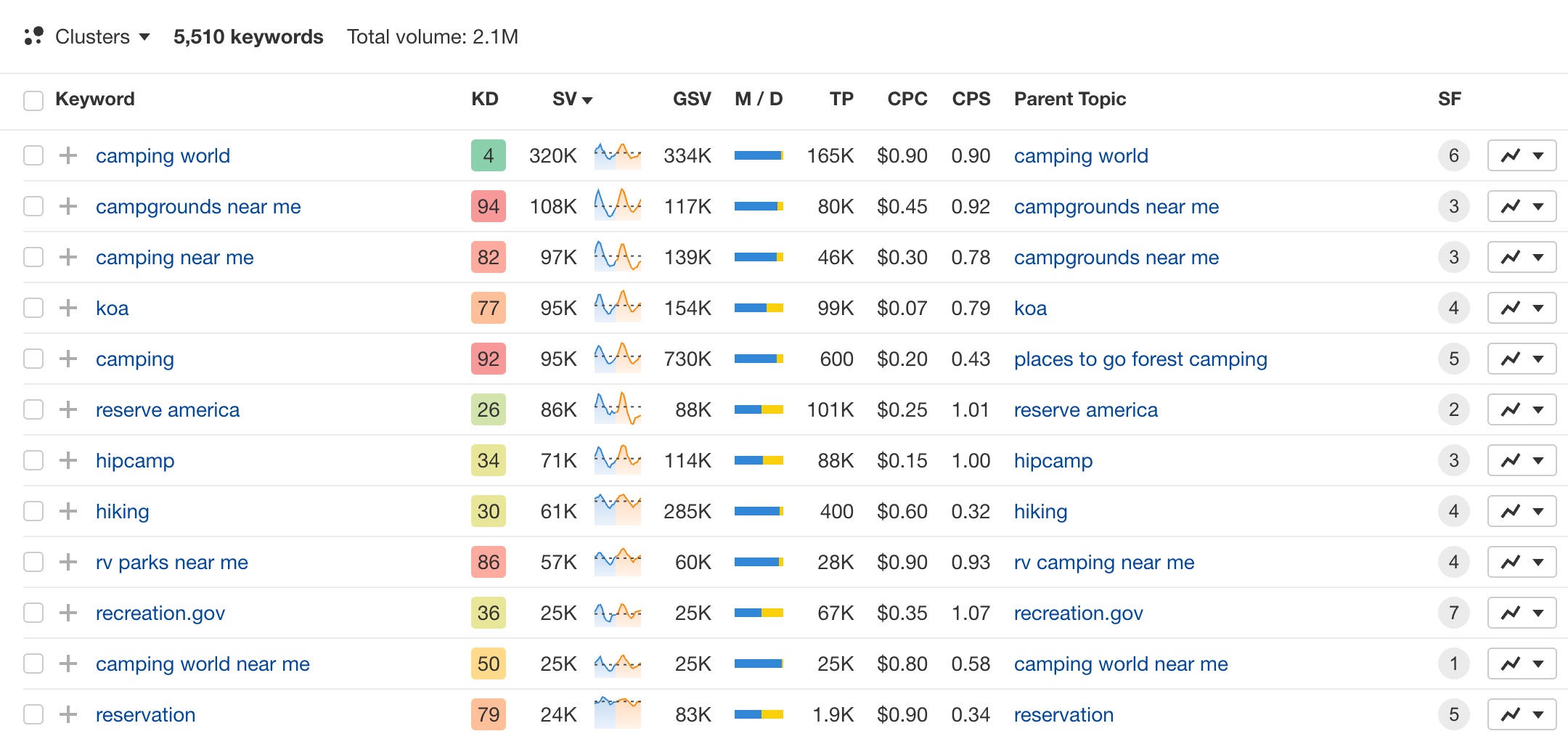
How I divide the work between SEO tools
| Job | My starting point | Information I need |
|---|---|---|
| Keywords, questions and new content directions | Ahrefs | Related terms, estimated demand, competition and search results. |
| SEO research inside ChatGPT | Ahrefs app or MCP | Data from an authorised Ahrefs workspace, organised for the task. |
| Demand comparisons and detailed backlink review | Semrush | Regional volume, trends, referring domains, linking pages and anchors. |
| My own website’s Google search performance | Google Search Console | Recorded impressions, clicks, queries and pages. |
| Page and internal-link checks | Screaming Frog | Crawlable page responses, titles, descriptions and link issues. |
For one website, start with Search Console and one paid platform that fits the work. Add the second when it regularly fills a data gap or saves enough preparation time to justify the subscription.
Ahrefs: keyword research that can continue in ChatGPT
I usually start with a few core service terms, select the target market and inspect related queries. For a Hong Kong or cross-border website, keep English, Traditional Chinese and Simplified Chinese research separate. Similar meanings don’t guarantee the same search results or the same destination page.
Look at what the leading results actually offer. A service page, a comparison and a tutorial answer different requests. If people want prices, a history article is unlikely to do the job. Volume and difficulty help narrow a list; the reader’s task still determines the page.
Ahrefs provides an API as well as app and MCP connections for ChatGPT. You don’t need to start by coding an integration or pasting an API key into a conversation. For everyday research, authorising the connection and making a specific request is the simpler route.
How to connect Ahrefs to ChatGPT
Use a ChatGPT account that supports the required connection and an Ahrefs account with appropriate access. Ahrefs MCP is available on Lite and higher plans and consumes API/integration units. ChatGPT availability also depends on your plan, location and workspace settings.
1. Open the app or plugin directory in ChatGPT. Search for Ahrefs and check that it’s the official service. Depending on the interface, look for Apps or Plugins. Ahrefs’ SEO MCP page also has a “Connect to ChatGPT” button.
2. Connect and sign in to Ahrefs. Check the workspace and requested access before authorising it. If company settings prevent installation, ask the administrator rather than creating a personal connection for company data.
3. Select Ahrefs in your conversation. Use @Ahrefs where supported, or choose the connected app from the tools menu. Typing the brand name alone doesn’t establish that the account is connected.
4. Start small. Specify a market, seed terms, fields and result count—20 keywords is enough for a first check. Confirm that the response uses Ahrefs and shows the intended market and data date before expanding the request.
After authorisation, it works much like asking a normal question. The useful skill is describing the research precisely, not learning to program first.
When a manual MCP connection is necessary
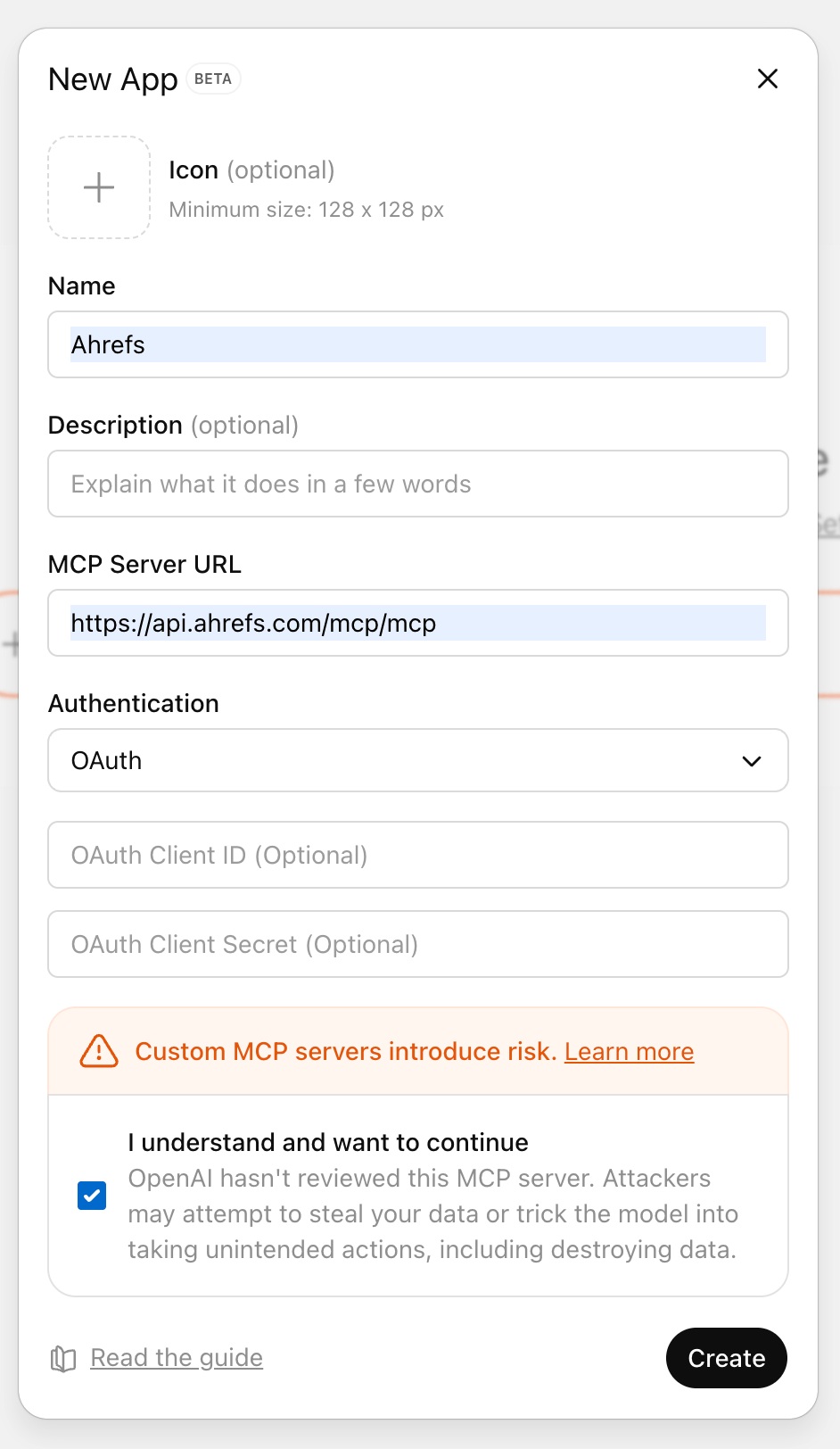
If your ChatGPT web account and workspace allow custom apps, go to Settings, Apps and Advanced settings, enable Developer mode and create an app. Name it Ahrefs, use https://api.ahrefs.com/mcp/mcp as the server URL and select OAuth. Ahrefs’ setup instructions leave OAuth Client ID and Client Secret blank. Finish by authorising the workspace.
This is an alternative route, not a step everyone needs. If the option is unavailable or prohibited by your administrator, use the directory app, request approval or export a file for ChatGPT to organise. An export is a snapshot; it won’t refresh itself.
Prompts that produce a usable research table
Start with a bounded data request:
Use the connected Ahrefs app to find 20 keywords related to “commercial interior design” and “office design” in Hong Kong. Return the keyword, estimated monthly volume and difficulty, sorted by volume. Don’t use web search or invented estimates to fill gaps; mark missing fields as unavailable. Read data only; don’t create or modify anything.
Then ask for a separate editorial task:
Group the results into service pages, comparisons and educational articles. Explain the grouping. Keep closely related terms together when one page could answer them; don’t create a separate page for every variation. List additional topic suggestions separately from the Ahrefs source data.
I would keep that distinction visible in the report. A metric returned by Ahrefs and a page grouping suggested by ChatGPT are different kinds of information. Retain the source, market and date so the next comparison has a useful basis.
If the connection fails, check authorisation, the selected workspace and remaining units. If ChatGPT answers without Ahrefs data, check that the app was selected. Asking for plausible numbers is not a substitute for retrieving the data.
Semrush: where I compare volume and investigate backlinks
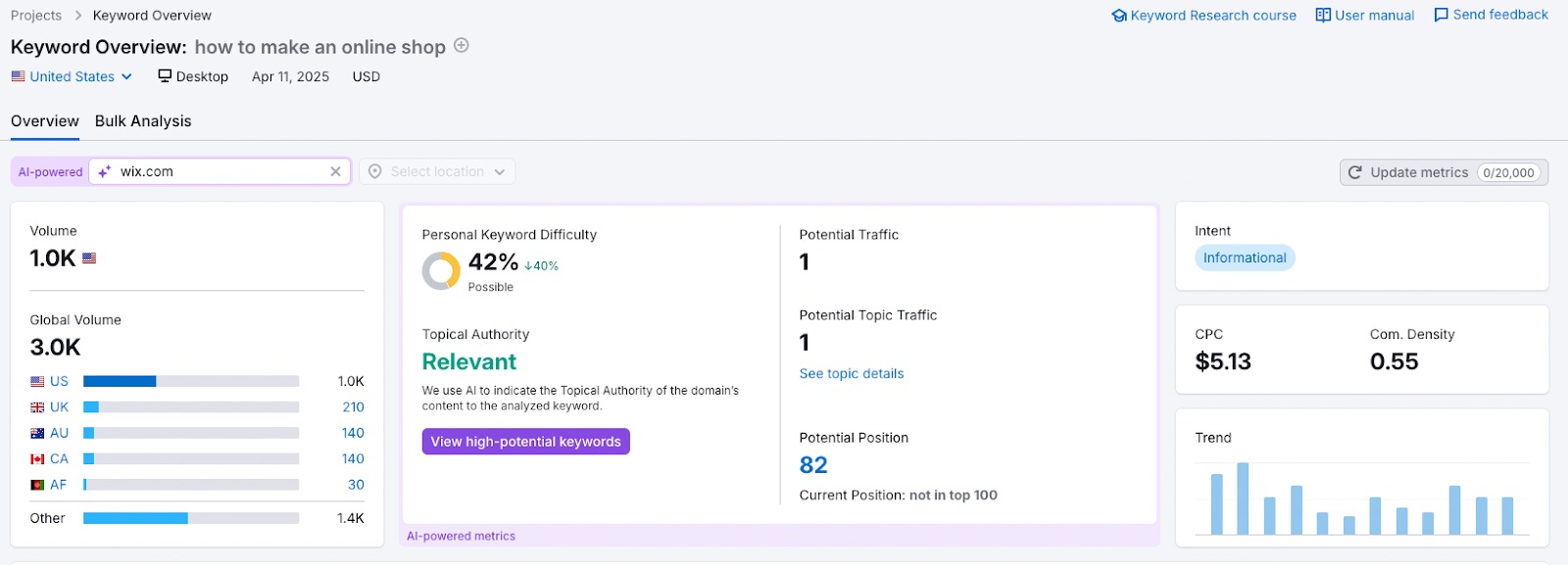
I prefer Semrush’s presentation for volume comparisons, and its backlink reports fit the level of detail I want. I compare the main terms’ monthly averages and trends within the same market before deciding which pages to prioritise.
Monthly search volume is not the number of clicks your website will receive. Semrush’s monthly average is based on the preceding 12 months, and Ahrefs also estimates search volume. When their figures differ, check the market, period and exact query before drawing a conclusion. Averaging the two doesn’t produce a verified count.
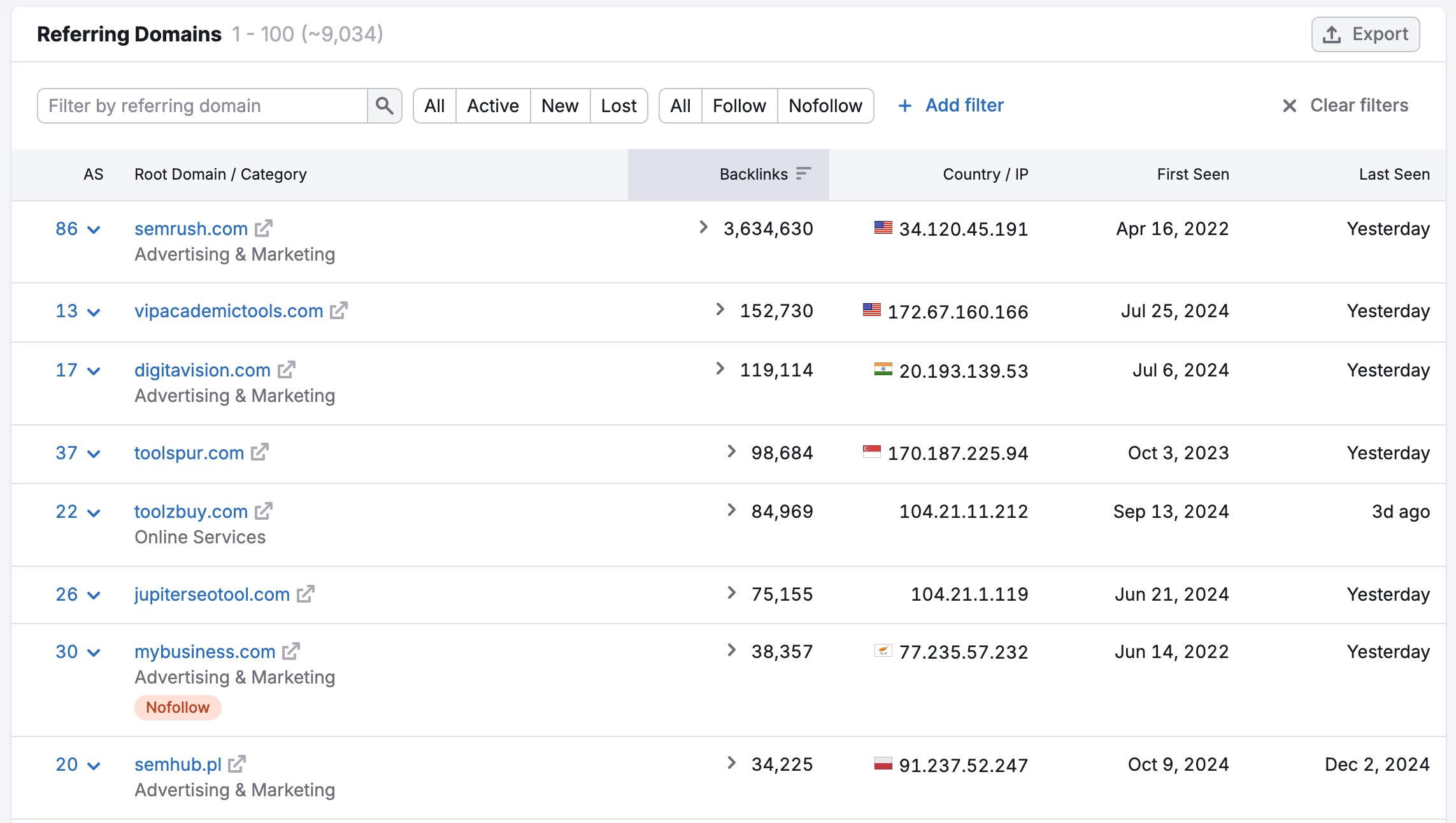
For backlinks, I want to know which sites link to which pages, not just the total. Semrush’s referring-domain report provides a starting list; from there, investigate linking pages, anchors and available change data. Open the source pages to check relevance and whether the links still exist.
If a competitor gains thousands of links, first check whether those are sitewide links from one domain. A footer repeated across thousands of pages isn’t thousands of independent editorial recommendations. Ahrefs can research backlinks too; Semrush is my preference because the reports fit how I review them.
The free tools I would keep
Search Console is the starting point for checking my own site’s Google search performance. Paid tools extend keyword discovery and competitor research. For performance comparisons, align dates, countries, devices and pages rather than treating one manual search as a month’s ranking.
Search Console has limits as well: some queries are omitted for privacy, and it isn’t a record of every individual search. It also doesn’t replace third-party research into sites you don’t control.
Screaming Frog handles a different job: crawling pages to inspect responses, missing titles and internal links. Its free version crawls up to 500 URLs per crawl, which is useful for an initial look at a small site. Decide whether to pay based on the URL count and advanced features you actually need.

If I could buy only one
For keyword research that I want to organise directly in ChatGPT, I would start with Ahrefs. For frequent volume comparisons and detailed backlink investigations, I would consider Semrush first. Keep Search Console in either case; a paid subscription doesn’t replace it.
Try one market, a set of service terms and two or three competitors. Finish the workflow and see whether it produces a usable keyword-to-page map, backlink sources worth investigating and pages that need attention. Those outputs tell you more about the subscription’s value than the number of reports in its menu.
Sources and image credits
- Ahrefs — Keywords Explorer
- Ahrefs — SEO MCP and official ChatGPT app link
- Ahrefs — ChatGPT web setup
- Ahrefs — MCP access and integration units
- Ahrefs — API v3 access and plan limits
- OpenAI — Connected apps in ChatGPT
- OpenAI — Plugins and installation
- OpenAI — Custom MCP servers
- Semrush — Search volume calculation
- Semrush — Keyword Overview
- Semrush — Referring Domains report
- Ahrefs — Search volume estimates
- Google — Search Console performance report
- Google — Impressions, position and clicks
- Screaming Frog — Getting started and free crawl limit
Product details checked on 27 November 2026. Tool preferences are Locke Lee’s working opinions, not a comparative accuracy test. Product images are public vendor examples, not client data or results retrieved for this article. Interfaces and example figures may differ from your current account.
- Ahrefs — An official example of the Ahrefs keyword research interface
- Ahrefs developer documentation — An example of manually creating an Ahrefs MCP app in ChatGPT
- Semrush Knowledge Base — An official Semrush Keyword Overview example
- Semrush Knowledge Base — An official Semrush referring-domain list example
- Kelly Sikkema / Unsplash — Reviewing documents using a laptop, calculator and printed material